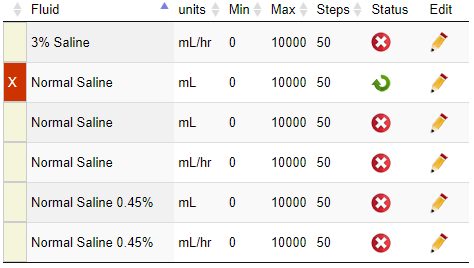
Pharmacists and technicians can edit fluids in WebAdmin by doing the following:
- Click Formulary and Fluid.
- Type the name of the fluid in the search box at the top of the list.
- Note: Just typing the beginning letters will filter the list and show you the fluid you are looking for.
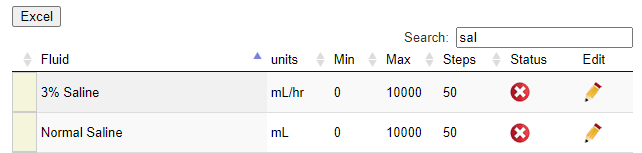
- Note: Just typing the beginning letters will filter the list and show you the fluid you are looking for.
- Click the pencil icon next to the fluid you want to edit.
- Units
- Minimum dosage
- Maximum dosage
- Step
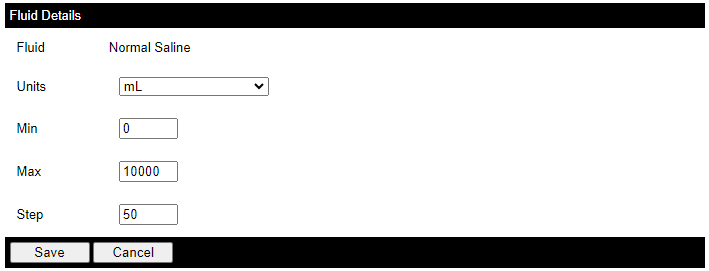
- Click Save.
Add a New Fluid
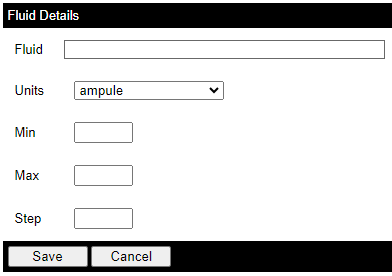
To add a new fluid, do the following:
- Click Formulary and Fluid.
- In the upper right corner, click the plus sign.

- Fill out the fluid details and click Save.
Additional Features
- To download a spreadsheet of the list, click the Excel button.
- To delete a fluid, click the red X icon. This will mark it inactive.
- To activate a fluid, check the box next to Show Inactive and click the green arrow next to the fluid name.