
You can add the PreOp role to users who need to create PreOp clinics. To add the role, do the following:
- Log in to your site's WebAdmin by going to [yoursite].plexus.cloud.
- Click Admin and Users.
- Click the pencil icon next to the user you wish to update.
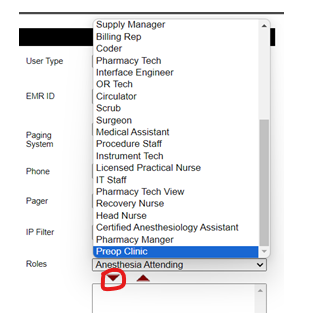
- Select PreOp Clinic from the Roles menu.
- Click the down arrow and Save.
After the upcoming 4.5.201 update, users without this role will not be able to access the PreOp Clinic feature.