
To remove a medication entry from the IntraOp anesthesia record, do the following:
- In Anesthesia Touch, in the Patient List, tap the patient’s record and then tap IntraOp.
- Tap the incorrect medication administration in the medication grid.
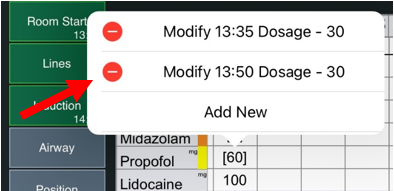
- A pop-up of medication entries will appear for the selected administration. Tap the minus sign next to the administration you want to remove.
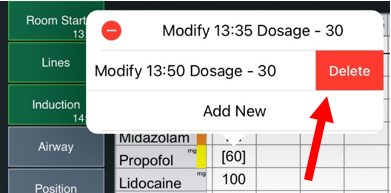
- Tap Delete.
Removing a Dose Over Time (DOT) Infusion
To remove a Dose Over Time (DOT) infusion, do the following:
- In Anesthesia Touch, in the Patient List, tap the patient record and Intraop.
- Tap the incorrect medication and the ∙- icon at the beginning of the infusion.
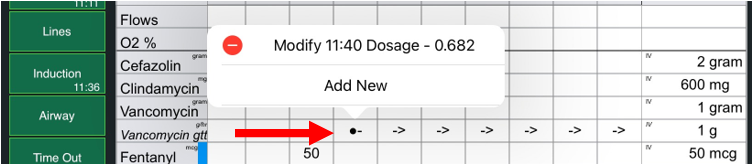
- Tap the minus sign and Delete.

- This will remove all doses.